今天来做增加纪念日的表单,这里表单检查用到了graceChecker,还挺好用的,支持验证空字符,数字,正则等等,需要哪个就用哪个。
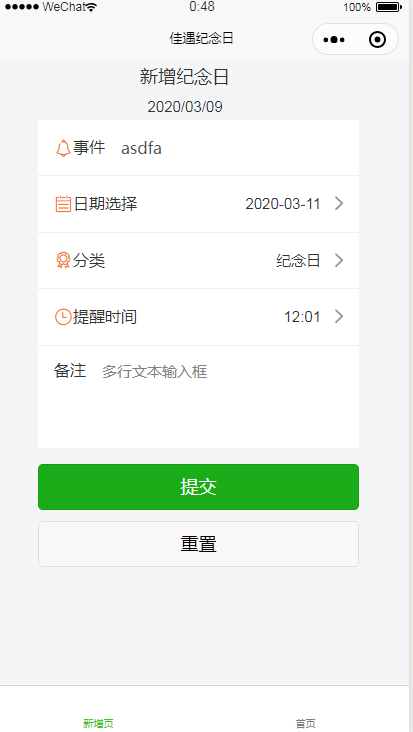
addform.vue页面代码:表单项样式用的是colorui的,主要注意几个表单组件的用法,比如日期,时间等。再就是学习下数据绑定,picker下拉列表初始化index值时要用字符串,如index:'0',如果换成数字会不识别。
<template>
	<view class="uni-padding-wrap">
		<view class="headerTitle">
			新增纪念日
			<view>{{today}}</view>
		</view>
		<view class="addform">
		<form @submit="formSubmit" @reset="formReset">
			<view class="cu-form-group">
				<text class='cuIcon-notice text-orange'></text>
				<view class="title">事件</view>
				<input placeholder="输入框事件标题" name="title" :disabled="title" v-model="title"></input>
			</view>
			<view class="cu-form-group">
				<text class='cuIcon-calendar text-orange'></text>
				<view class="title">日期选择</view>
				<picker name="theday" mode="date" :value="date" start="2015-09-01" end="2020-09-01" @change="DateChange">
					<view class="picker">
						{{date}}
					</view>
				</picker>
			</view>
			<view class="cu-form-group">
				<text class='cuIcon-selection text-orange'></text>
				<view class="title">分类</view>
				<picker @change="PickerChange" :value="index" :range="addtype" name="type">
					<view class="picker">
						{{index>-1?addtype[index]:'禁止换行,超出容器部分会以 ... 方式截断'}}
					</view>
				</picker>
			</view>

			<view class="cu-form-group">
				<text class='cuIcon-time text-orange'></text>

				<view class="title">提醒时间</view>
				<picker mode="time" :value="time" start="09:01" end="21:01" @change="TimeChange">
					<view class="picker">
						{{time}}
					</view>
				</picker>
			</view>
			<view class="cu-form-group align-start">
				<view class="title">备注</view>
				<textarea maxlength="-1" :disabled="modalName!=null" @input="textareaBInput" placeholder="多行文本输入框"></textarea>
			</view>

			<view class="uni-btn-v">
				<button form-type="submit" type='primary'>提交</button>
				<button type="default" form-type="reset">重置</button>
			</view>
		</form>
		</view>
	</view>
</template>

<style>
	.uni-form-item .title {
		padding: 20rpx 0;
	}
	.headerTitle{
		font-size: 18px;
		text-align: center;
	}
	.extraInfo {
		font-size: 24rpx;
		color:#666666;
		margin-top: 0px;
	}
	.headerQuestion{
		font-size: 18px;
	}
	.headerDesc{
		color:#7A7E83;
		font-size: 16px;
	}
	.headerRedDesc{
		color:red;
		font-size: 16px;
		display: inline;
	}

	.manageIn {
		position: absolute;
		top: 10rpx;
		right: 30rpx;
		color: #007aff;
	}
	.addform{
		margin-left:50upx;

	}

</style>
<script>
	var graceChecker = require('common/graceChecker.js');
	import moment from 'moment';
	import {
		mapState
	} from 'vuex';
	const app = getApp();
	export default {
		computed: mapState(['hasLogin']),
		data() {
			return {
				'today':moment().format('YYYY/MM/DD'),
				company:'',
				companyDisabled: false,
				jobnumber: '',
				jobnumberDisabled: false,
				department: '',
				departmentDisabled: false,
				name: '',
				nameDisabled: false,
				date: moment().format('YYYY-MM-DD'),
				time: '12:01',
				index: "0",
				addtype: ['未分类', '生日', '纪念日'],
			}
		},
		onLoad: function(option) {
			if(option.id) {
				this.company = option.id;
				this.companyDisabled = 1;
			}
			const employee = app.globalData.employee;
			if (employee.company) {
				this.company = employee.company;
				this.department = employee.department || '';
				this.jobnumber = employee.jobnumber;
				this.name = employee.name;

				this.companyDisabled = true;
				this.departmentDisabled = this.department;
				this.jobnumberDisabled = true;
				this.nameDisabled = true;
			}
		},
		methods: {
			goManage: function() {
				if (!this.hasLogin) {
					uni.navigateTo({
						url: '../user/login'
					});
				} else {
					uni.navigateTo({
						url: '../manager/index'
					});
				}
			},
			PickerChange(e) {
				this.index = e.detail.value
			},
			TimeChange(e) {
				this.time = e.detail.value
			},
			DateChange(e) {
				this.date = e.detail.value
			},

			formSubmit: function(e) {
				console.log('form发生了submit事件,携带数据为:' + JSON.stringify(e.detail.value))
				//定义表单规则
				var rule = [{
						name: "title",
						checkType: "notnull",
						checkRule: "",
						errorMsg: "请填写事件标题"
					},
					{
						name: "type",
						checkType: "notnull",
						checkRule: "",
						errorMsg: "请选择分类"
					},
					{
						name: "theday",
						checkType: "notnull",
						checkRule: "",
						errorMsg: "请选择日期"
					}

				];
				//进行表单检查
				var formData = {data:e.detail.value};
				console.log(formData);
				var checkRes = graceChecker.check(formData.data, rule);
				if (!checkRes) {
					uni.showToast({
						title: graceChecker.error,
						icon: "none"
					});
				} else {
					uni.showLoading({
						mask: true,
						title: '处理中...'
					});
					wx.cloud.callFunction({
						name: 'addform_collect_submit',
						data: formData
					}).then((res) => {
						console.log(res)
						uni.hideLoading()
						uni.switchTab({
							url: "../index/index",
							success:function(e){
								console.log(e);
							},
							fail:function(e){
								console.log(e);
							},
							});


						// uni.showModal({
						// 	content: `提交成功,建议:${res.result.status}`,
						// 	showCancel: false
						// })
					}).catch((err) => {
						uni.hideLoading()
						uni.showModal({
							content: `添加数据失败,错误信息为:${err.message}`,
							showCancel: false
						})
						console.error(err)
					})
				}
			},
			formReset: function(e) {
				console.log('清空数据')
			}

		}
	}
</script>
2.增加云函数addform_collect_submit,内容如下:
// 云函数入口文件
const cloud = require('wx-server-sdk')

cloud.init()
const db = cloud.database();
exports.main = async (event, context) => {
//event为客户端上传的参数
console.log('event : ' + event)
//返回数据给客户端
const collection = db.collection('testcollection')
//插入数据库测试
await collection.add(event);
return {
  status: 1
}

};
3.另外还学习了跳转页面的uni.switchTab的用法,这里的url是相对路径,用sucess,fail来查找错误
uni.switchTab({
	url: "../index/index",
	success:function(e){
	console.log(e);
	},
	fail:function(e){
	console.log(e);
	},
	});
4.效果如下
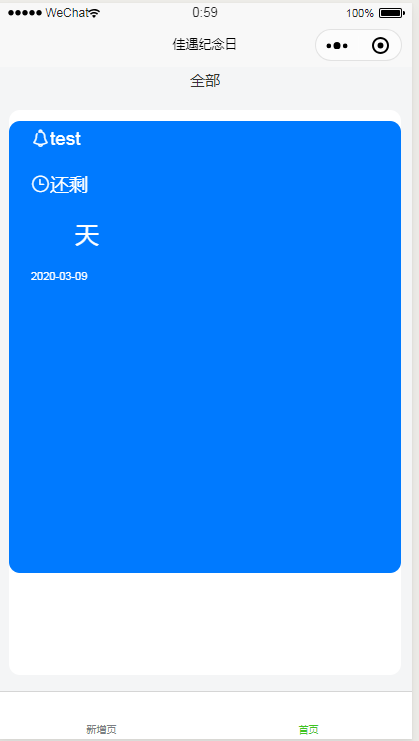
剩余多少天这个需要在云函数里计算一下,下一步就是做这个计算剩余天数,以及对纪念日进行分类显示。

有话要说...